Discount codes (also called coupons) are codes customers enter at checkout to reduce the price — "SPRING25" for 25% off, "FRIENDS" for a fixed-dollar discount, and so on. This guide covers creating and managing them.
Open the discounts page
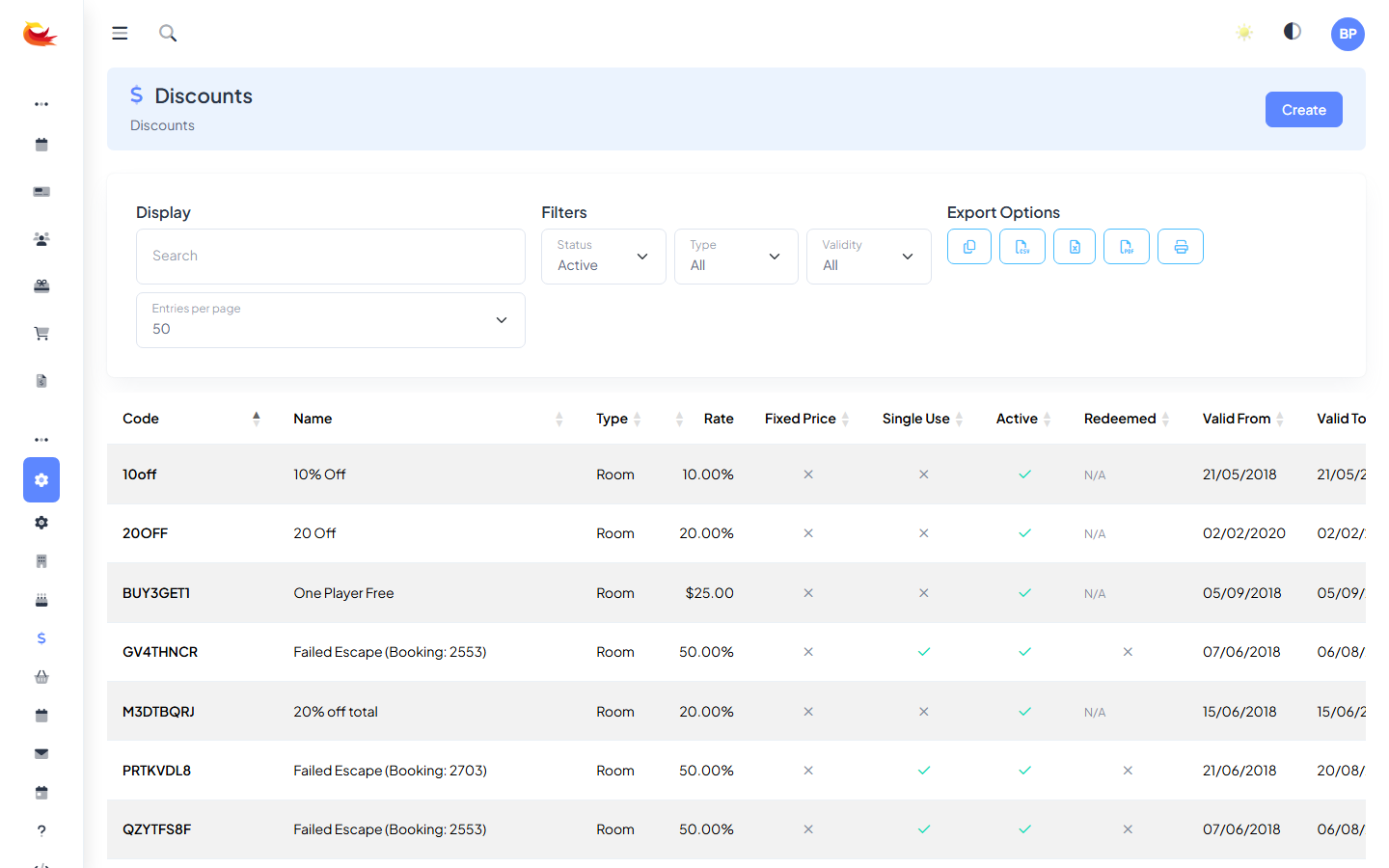
Go to Settings → Discounts. You'll see a list of all discount codes with their status (Active / Inactive), type (Room / Product / Gift Voucher), and validity period.
Creating a new code
Click Create (top right) to open the new-discount modal.
Basic details
- Code — what customers type in. Usually uppercase, no spaces (e.g.
SPRING25,VIP10). Must be unique across your branch. - Name — internal label for reports and the discounts list.
- Description — shown to customers when the code is applied, e.g. "Spring 2026 promotion".
Discount type
Three types, each applying to different things:
- Room — discounts a room booking total.
- Product — discounts an add-on product (an upgrade, a retail item).
- Gift Voucher — discounts a voucher purchase.
You can restrict a code to specific rooms or specific products, so "GAMEOVER10" might work only for the Haunted Mansion room, not every room.
Discount value
- Percentage — e.g. 25% off the total.
- Fixed amount — e.g. $10 off.
Percentage discounts scale with group size, which most promoters want. Fixed amounts are flatter and can be worth more on small groups than the operator intended — use with care.
Validity
- Valid from — the earliest booking date/time the code works. Leave blank for "immediately".
- Valid until — expiry. After this, the code stops working.
- Max uses — total number of times the code can be redeemed across all customers. E.g. "first 50 customers only".
- Max uses per customer — prevents one customer stockpiling uses. Usually 1.
Booking date restrictions
Separate from validity: restrict which booking dates the code applies to. E.g. "Use by Dec 31 but only valid for January bookings" — validity until 31 Dec, booking date restriction 1–31 Jan.
Saving
Click Save. The code is active immediately (if Status is on) and will work on the widget and POS.
Testing a new code
Always test a new code before announcing it:
- Open your booking widget or POS.
- Start a booking for the eligible room/product.
- Enter the code in the discount field.
- Confirm the discount applies at the expected amount.
If the code doesn't work as expected, the usual suspects:
- Status is Inactive.
- Valid date range doesn't cover today.
- Room/product restrictions don't match what you're booking.
- Max uses has been hit.
Deactivating a code
To stop a code working without deleting it (keeps the usage history intact):
- Open the discount.
- Toggle Status to Inactive.
- Save.
Customers entering the code will see "discount code not valid".
Tracking performance
Each discount's detail page shows how many times it's been used and the total discount given. For campaign-level reporting across multiple codes, use the Bookings report filtered by discount — you can see the true revenue impact.
Common patterns
- First-time customer promo — 10% off, unlimited uses, 1 per customer, no booking restrictions. Drives trial.
- Flash sale — 25% off, 100 uses cap, valid from/until tight window, booking date matches the promotion period.
- Referral code — fixed $ off, 1 use per customer. Share with your VIPs to pass to friends.
- Corporate code — unlimited uses, long validity, restricted to bookings by a specific email domain (request this from support — not a built-in field).
Abuse prevention
- Use "max uses per customer" on single-user codes (referrals, VIP codes).
- Don't publish codes publicly if you want them to stay exclusive — screenshots spread.
- For very high-value codes, consider a short validity window.
- Review the discount usage report monthly — unusual spikes are worth investigating.
Was this article helpful?
That’s Great!
Thank you for your feedback
Sorry! We couldn't be helpful
Thank you for your feedback
Feedback sent
We appreciate your effort and will try to fix the article