Redeeming means applying a voucher's balance against a booking (or voucher purchase). This guide covers the staff-side redemption flow, partial redemptions, and what to do when things go wrong.
Where redemption happens
Two flows:
- Staff-assisted — a staff member applies a voucher to a booking from the POS or a booking modal.
- Self-service — the customer enters their voucher code on the booking widget; the widget deducts the voucher value from the total.
Both end up in the same place — the voucher balance decreases, the booking is marked as partially or fully paid.
Staff-assisted redemption
1. Start a booking
Take the booking as normal — select the slot, enter customer details, set player counts. See Taking a Booking for the standard flow.
2. Enter the voucher code
In the payment panel on the booking modal, find the Voucher field. Enter the code and click Apply.
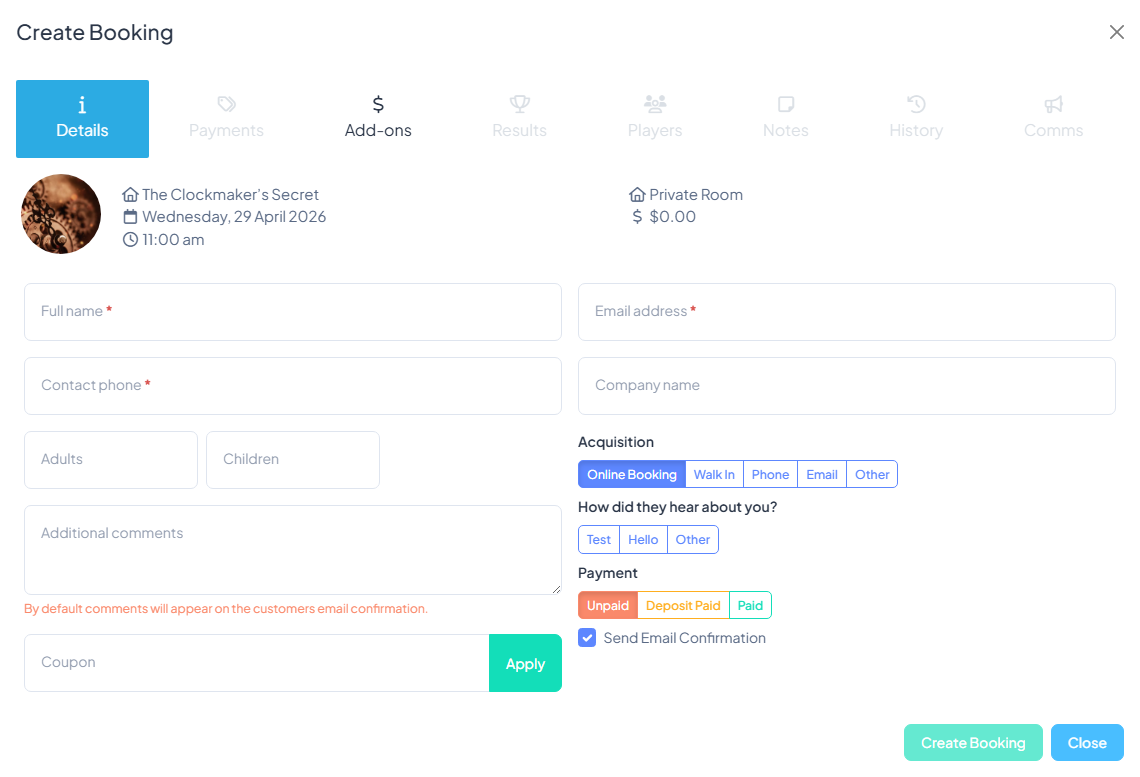
The system looks up the voucher and:
- Confirms it's active (not void, not expired).
- Checks the available balance.
- Applies the lesser of the balance and the booking total to this booking.
3. Check the result
The booking's price panel shows:
- Original total (e.g. $120).
- Voucher applied (e.g. "−$100 (voucher SAMS-VOUCHER)").
- Remaining balance to pay (e.g. $20).
If there's a remaining balance, take payment by card or record a cash/EFTPOS payment. If the voucher covered the full booking, the balance is $0 and you can save.
4. Save the booking
Click Save. The voucher's remaining balance updates, and the redemption is logged on both the voucher's record and the booking's payment history.
Partial redemption
If the booking total is less than the voucher balance (e.g. a $30 booking against a $100 voucher), the voucher is applied for $30 only. The voucher still has $70 remaining — the customer can use it on future bookings.
If the booking total is more than the voucher balance ($150 booking against a $100 voucher), the full $100 is applied and the customer pays $50 additional.
Self-service redemption
Customers enter their voucher code themselves on the booking widget. Flow:
- They pick a slot and enter player counts as normal.
- On the payment step, a "Have a gift voucher?" link expands a code input.
- They enter the code and click Apply.
- The total updates with the voucher applied.
- They pay any remaining balance with a card (or the booking goes straight to confirmation if the voucher covered the full amount).
Common issues
"Voucher code not found"
- Double-check spelling — codes are case-insensitive but typos matter.
- Check the code belongs to your tenant. Vouchers from other businesses won't work.
- The voucher may have been voided. Check the voucher record on the Vouchers list.
"Voucher has expired"
The voucher's expiry date has passed. Your options:
- Refuse the redemption per your policy.
- Extend the expiry as a goodwill gesture — open the voucher and update the expiry date, then re-apply.
- In some jurisdictions, gift vouchers below certain value or issued for certain reasons cannot legally be expired — check your local law.
"Voucher has no balance"
Fully redeemed previously. Check the voucher's redemption history — it'll show past uses. If the customer insists they haven't used it, investigate: wrong code, fraudulent redemption, or bug.
"Voucher is inactive"
Voided. Only issue: reactivate from the voucher record if it was voided in error.
Refunding a voucher-paid booking
If a booking paid partly or fully by voucher is cancelled and refunded, you have a choice on where the refund goes:
- Back to voucher — the voucher balance is restored by the refunded amount. Best when the customer may want to rebook.
- New voucher — issue a fresh voucher for the refunded amount. Similar effect but leaves a cleaner audit trail.
- Cash refund — only if the voucher was purchased (not comped), and your policy allows cash refunds on voucher-paid bookings. Most operators don't allow this because it lets vouchers be converted to cash.
Tracking redemptions
Every voucher has a redemption history panel on its detail page — which booking, when, for how much, which staff member processed it. The Voucher Sales report shows aggregate redemption trends across all vouchers.
Fraud prevention
Voucher codes are bearer instruments — whoever has the code can redeem. Mitigations:
- Don't publish voucher codes publicly.
- If a customer reports their voucher stolen, void the original and issue a replacement (flag in the customer's notes).
- Long random codes (the default) are hard to guess; avoid short custom codes for high-value vouchers.
- Review the Voucher Sales report for unusual redemption patterns — a single voucher redeemed repeatedly across different customers is worth investigating.
Was this article helpful?
That’s Great!
Thank you for your feedback
Sorry! We couldn't be helpful
Thank you for your feedback
Feedback sent
We appreciate your effort and will try to fix the article